

Find the right chat
A chat leaves Needs reply when you answer it, ignore it or archive it. It also doesn’t appear there if its sender account is gone or disconnected, if the person is on your team, or if their stage is Lost.
The list refreshes every 30 seconds. To narrow it down, use the search box or the filter button, All replies:
- Starred shows the chats you starred.
- A tag shows only replies with that tag.
- More filters adds Sender, Campaign and Show archived. Archived replies stay searchable, and archiving doesn’t change their campaigns. Clear filters resets everything.
Reply tags
We read each reply and give it a tag. A row can also show a stage, its campaign and “Reply sends at” a time if a reply is on hold.Tag counts
The strip above the list shows each tag and how many chats have it.- Each number is what the list will show after you pick that tag.
- Counts follow your tab, search, sender, campaign and other filters. They ignore only the tag you picked.
- Tags with no chats don’t appear.
- Press a tag to filter by it. Press it again to clear.
Change a tag
If a tag is wrong, press Change next to it in the chat header and pick another, or press Clear tag. This sends nothing. Setting a reply to Interested or Wants a call moves the person’s stage to Interested and creates a task, as described in Stages from replies.Answer a reply
1
Open the chat
If we have a suggestion, it’s already in the box. Nothing has been sent.
2
Edit it, or ask for a new version
Change anything you like. Try another writes a new one. Shorter, Friendlier and Propose a call rewrite it. If the box is empty, press Write with AI.
3
Press Send
Press Send, or ⌘/Ctrl+Enter. It goes out from the sender shown under the box, on LinkedIn. It can’t be unsent.
When you can’t send
AI drafts on Free
Free workspaces get 10 AI drafts a day, shared across the workspace. The count resets at midnight UTC. Typing and sending your own replies still works after that. Paid plans and trials that include outreach have no draft limit. See Plans.Held auto-replies
Some campaigns send simple replies by themselves. The campaign’s settings then say “Replies are sent automatically right now.” When such a reply is ready, it waits 10 minutes before it goes out. The box says “This reply sends by itself at” a time, and the row shows it in the list. Until then, you decide: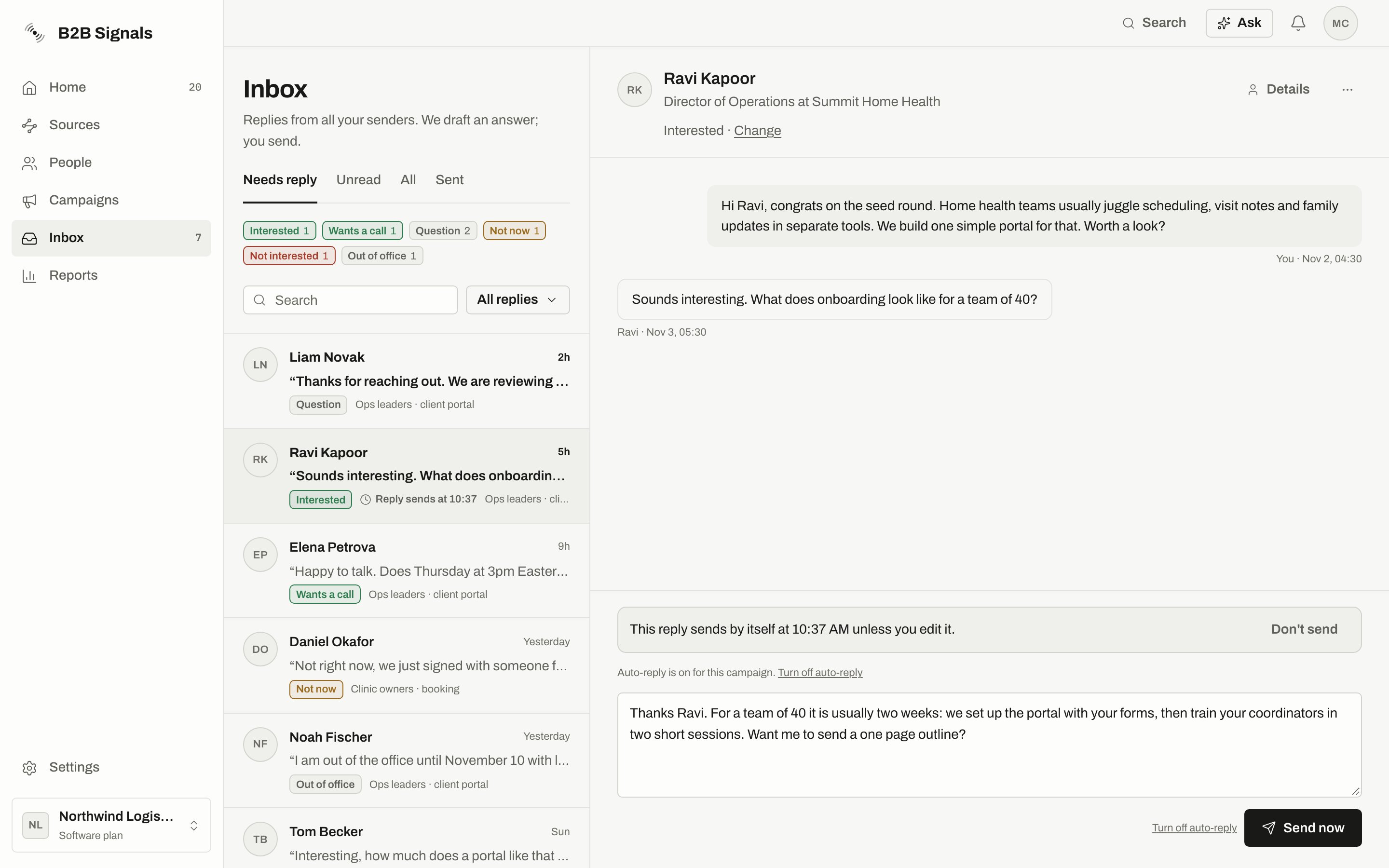
A held reply: the tag strip above the list, the time in the row, and Don't send and Send now in the chat.
What auto-reply will and won’t answer
Checks before a held reply goes out
We check everything again when the 10 minutes end, and again if you press Send now.
A held reply that’s more than 30 minutes overdue also becomes a draft instead of sending late.
Other things you can do in a chat
The ⋯ menu in the chat has:
Select several rows to Mark as read, Archive, Star or Mark as unread in one go. On a phone, swipe a row instead.
Stages from replies
Replies move a person’s stage forward on their own.
A “Wants a call” tag doesn’t move someone to Meeting. Meeting means a time is booked or agreed.
To change the stage by hand, press Details. The stage control there offers Replied, Interested and Meeting. A line under it says “Set from their reply” or “Set when you tagged the reply”, with Undo. Undo works only until something else changes the stage, and it leaves tasks as they are.
Details also has Add to list and Add to campaign in its menu.
When Inbox looks empty
All caught up
All caught up
Nobody is waiting on you. Press Review messages to look at what’s waiting for approval.
No replies match
No replies match
Your search or filters hide everything. Press Clear filters.
A reply I expected isn't in Needs reply
A reply I expected isn't in Needs reply
Check All. The chat may already be answered or ignored, or its sender may be disconnected. Replies that didn’t come from a campaign don’t go to Needs reply. Check Show archived under More filters too.
No sender connected
No sender connected
You can use Inbox after you connect a LinkedIn account. If you’d rather send messages yourself, press Use this for now to open Manual sends.
Related
Stages
What each stage means.
Approvals
Review campaign messages before they go out.
Do not contact
Stop all contact with a person or company.
Connect LinkedIn
Fix a disconnected sender.